
Charleston Vacation Rental Website Design
By Direct Stay Solutions ·
A guest booking a weekend on Upper King wants something different from a family heading to Folly Beach. A good Charleston rental website sells the trip your property can actually deliver. Show guests what’s close, how they’ll get there, and why they’d want to stay at your place. Then give them a clear way to check dates.
Build the stay around the Charleston trip
A Charleston weekend can mean a walk through the historic district, a late night on Upper King, or breakfast before a day at Folly Beach. Choose the trip your address and property actually serve. Then show what that trip looks like from your front door.
- French Quarter and the historic district
A couples’ stay could lead with coffee in a private courtyard before a walk to the City Market or Waterfront Park. Start with the neighborhood and the route from the door. Photograph the courtyard and show whether guests will have stairs, a shared entrance, or an assigned parking space. Search to research: “Charleston historic district rental with private courtyard.”
- Upper King Street and Cannonborough-Elliotborough
For a dinner and nightlife weekend, show where guests can walk to Upper King and how they’ll get back after a show or drinks. A pair of real bedrooms, a well-lit entrance, and space for two couples to get ready can sell this stay. Describe evening street noise honestly. Search to research: “two-bedroom vacation rental near Upper King Street with parking.”
- James Island and Folly Beach
A James Island cottage can suit guests who want a beach day and a downtown dinner. Give each drive its own directions and show where guests can rinse sand off and hang wet towels. If the property is on Folly Beach, name the public beach access guests will use and explain the walk from the house. Search to research: “James Island cottage for day trips to Folly Beach” or “Folly Beach rental near public beach access,” according to the real address.
- Sullivan’s Island and Isle of Palms
Market the beach your guests will actually use. At a Sullivan’s Island stay, identify the access station and explain the walk. At an Isle of Palms condo, show which entrance, parking space, and beach route guests get. For a family, a photo of the path and a note about stairs can be more useful than another sunset. Search to research: “Isle of Palms family condo with parking and beach access.”
Use Explore Charleston’s dining and nightlife guide to help plan a downtown itinerary. Verify your own route, travel mode, and entrance. Give a travel time only after checking it, and explain when traffic, parking, or weather can change it.
Show how guests get from your door to the places they came for
For each trip, name a destination and say whether guests walk, drive, use rideshare, or take transit. A beach route should tell them where to park and which public access to use. A downtown guide should show where they’ll start, where they’ll end the evening, and how they’ll get back. If DASH helps, name the stop and link to the current CARTA route.
On the property page, show the actual parking space, entrance, stairs, beds, and outdoor space.
Give guests a reason to remember your rental
In a crowded Charleston market, a guest should be able to say what makes your place worth choosing in one sentence. Read recent reviews for what people remember. Maybe it’s coffee in the courtyard, a private gate after dinner, or a place to leave wet beach gear. Choose a name that fits that experience, show the detail in your lead photo, and keep the same name and promise on the property page and booking screen.
Fictional positioning example. “Palmetto Yard Stay is a two-bedroom James Island cottage with off-street parking and a private courtyard. Spend the afternoon at Folly Beach, rinse off at the cottage, then drive downtown for dinner.”
Lead with a real photo of breakfast in the courtyard. Show the parking space and rinse-off area next. Put separate buttons or links for See the Folly Beach day plan and Check cottage dates. A guest who remembers the name can find the same site when they want to come back.
Fictional stay. Use your own verified access and property details. The photo illustrates the area.

Rainbow Row, an example downtown stop. Photo cropped for display. zaphodsotherhead · CC BY 2.0

Build SEO around the property and the trip
- Give the property page the lodging search. Use a clear title like “James Island Two-Bedroom Cottage with Parking | Palmetto Yard Stay.” Show proof of the parking, room layout, courtyard, and drive to the places guests ask about. The same principles apply to a downtown stay, but the page should answer different questions.
- Give a useful itinerary its own page. A guide called “A Folly Beach Day from James Island” can show the route, access point, parking options, and where to check current beach rules. Link back to the cottage where it helps the reader, with an easy route to dates. For an Upper King rental, write a dinner-and-return guide with the verified walk and entry instructions.
- Build the technical foundation. Give the property and each local guide a distinct page title. Link the guide to the relevant rental page, and make it easy to get from there to availability.
- Measure what each page earns. Review Search Console by page and query. Then check whether readers from a guide click through to the property, look up dates, or reserve. Use that information to improve the pages that attract the right guests.
See the vacation rental SEO guide for the technical checklist and a plan for what to improve first.
Connect the story to direct booking
The property page’s Check dates button should open the right rental in a compatible booking engine. Keep the property name, party size, dates, fees, and total consistent from the property page to the quote. If you use a supported property management system such as Guesty, the site can feed direct bookings into the same system as connected Airbnb and Vrbo reservations.
Direct bookings can avoid marketplace commissions on those stays. Compare the guest’s full price and what you keep for the same dates and terms, including processing, booking software, and website costs. For illustration, a $100 marketplace fee on $1,000 in lodging versus $30 in direct payment processing leaves a $70 difference before website and booking software costs. Use your actual statements to see whether you could keep more or offer the guest a better price. Compare direct-booking margins.
See how it works at Norfork Lakefront Cabins
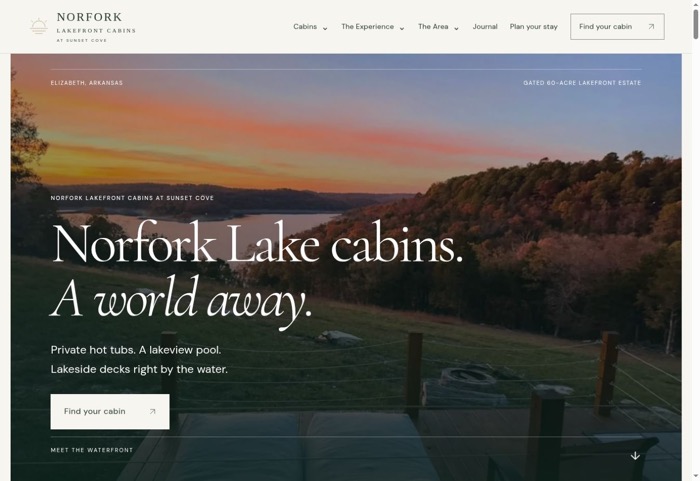
At Norfork Lake in Arkansas, we built one recognizable brand for three distinct cabins. Each cabin has its own page, and guests can check Overlook Cabin’s availability through Guesty. A Charleston site can do the same for a different kind of trip: show what makes the stay worth choosing and give guests a clear path to dates. See the Norfork project.
Meet Dane, founder of Direct Stay Solutions

I’m Dane. I started Direct Stay after building the website and search foundation for my own rental business. For your Charleston property, I’d start with the trip guests already book you for, build a site around it, and connect the booking tool you use. Managed Website includes hosting, maintenance, and a monthly SEO review, starting at $59/month for founding clients with $0 down. Outright builds start at $500.
Send me your listing and the Charleston trip your guests ask about most. I’ll show you what I’d put on the first page. Get your free 3-day website preview.