
When we built the Norfork Lakefront Cabins site, I wanted guests to answer three questions without guessing. Which cabin fits my group? What do I get to myself? Where do I check dates and see the price? Here’s how those decisions work on the live site.
Help guests choose the cabin that fits
The guest question. “There are three of us. Which cabin has room for us, and what does each one feel like?”
What we built. The live comparison table puts capacity, sleeping space, who each stay suits, and private hot tubs side by side. The Couples Retreat sleeps two. The Treehouse sleeps three and lists a queen and a single. The Mountain Cabin has two bedrooms and sleeps up to five. Guests can choose a page to explore before opening three galleries.

What I’d copy. Use the same rows for each unit and add one line about the trip it fits. If a third guest sleeps on a single bed or sofa bed, show that in the comparison.
Say what comes with the cabin and what guests share
The guest question. “Is the hot tub ours, and will we share the deck or pool?”
What we built. The Couples Retreat page lists its hot tub as private and the estate’s lakeside decks and seasonal pool as shared. It also explains that a road serving the pool and owners’ lake house passes near the cabin. We gave the estate its own space on the site so guests could see what comes with the setting.
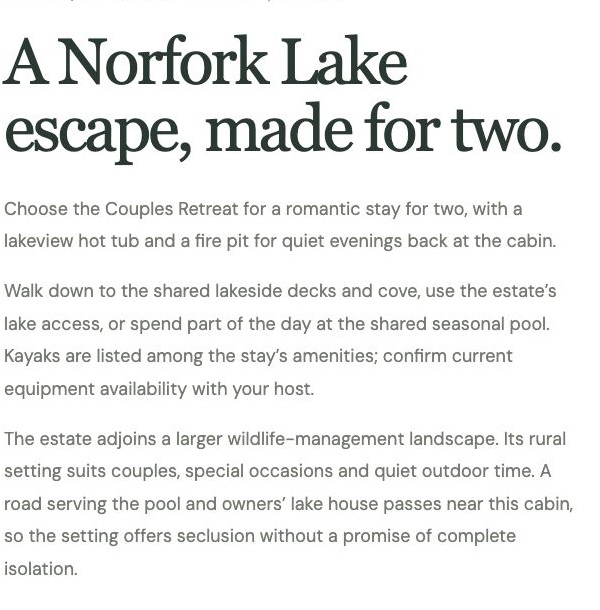
What I’d copy. Put the privacy detail beside the amenity photo. If the deck is shared or the pool is seasonal, say so where guests first see it.
Tell guests what happens when they check dates
The guest question. “Will I still be looking at the cabin I picked after I tap Search?”
What we built. On the Couples Retreat date form, guests enter arrival, departure, and party size before the search continues on Guesty. The page tells them to select Overlook Cabin in the booking results and confirm the cabin name, total, and policies before reserving.
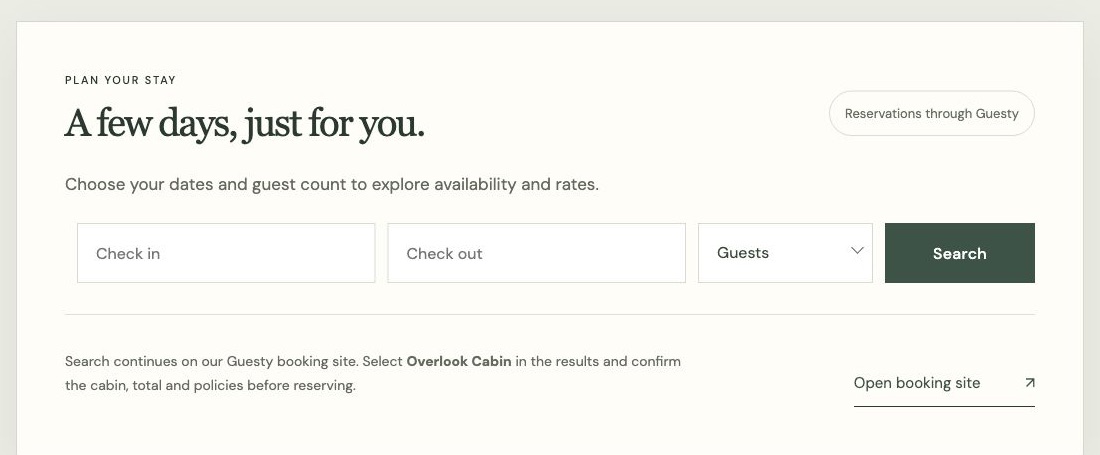
What I’d copy. Start on a phone, follow a normal quote into your provider, and write down what changes on the way. If the provider shows several rentals, name the one guests should choose. Run the mobile booking test on your own site.
See the full Direct Stay project.
See which details belong on the collection and cabin pages
- Collection
- One shared name and a way to compare all three stays.
- Individual cabin
- Specific photos, amenities, and a clear route to that property’s dates.
- Overlook
- In Guesty, select Overlook Cabin and review the quote and policies before reserving.
Related guide: How to Build a Website for Multiple Vacation Rentals.
Build one brand around stays guests can tell apart
I’d show the shared setting and individual stays under one brand, with a compatible booking path for the property guests choose.
- Custom website and a recognizable brand. We use your property’s photos and story to build mobile-friendly pages that show guests what they’d be booking.
- Search visibility. We organize the pages around what guests look for and set up the technical SEO. The managed plan includes a monthly search review.
- Direct booking. We connect a compatible calendar, booking engine, or inquiry flow and check the handoff. Third-party software and payment processing may cost extra. Explore compatible booking tools.
- Website management. The managed plan includes hosting, security, backups, maintenance, and an SEO review. See plans and what’s included.
See the pieces working together at Norfork Lakefront Cabins, where each stay has its own page under one brand and Overlook Cabin connects to Guesty for availability and reservations. See the Norfork project.
If you have a few distinct rentals under one name, send me the listings and tell me what the stays share. I’ll show you how I’d introduce the setting, compare the properties, and connect the dates. Get your free Direct Stay website preview.
Meet Dane, founder of Direct Stay Solutions

At Norfork I started with what makes each cabin worth choosing, then gave visitors a way to compare the stays. Send me your mix of properties and I’ll show where I’d draw the line between the shared brand and the individual pages.